
How to Choose the Right Dive Computer
More Than Just Another Piece of Gear
Every dive should begin with a plan. Whether you're planning your dive using dive tables or diving with a computer, understanding your limits before entering the water is one of the foundations of safe diving. Modern dive computers have made that process easier than ever, and personally, I can't imagine diving without one. Technology has advanced tremendously over the years, and choosing to dive without a computer means giving up one of the best safety tools available to recreational divers.
One of the questions I get asked more than almost any other is, "What dive computer should I buy?" Walking into a dive shop or searching online can feel overwhelming when you're suddenly looking at dozens of different models. Every manufacturer promises theirs is the best, every diver seems to have a favorite, and every computer comes with a long list of features that sound important. Choosing the right one doesn't have to be nearly as complicated as the marketing makes it seem.
After teaching hundreds of divers over the years, I've realized most people start with the wrong question. Instead of asking which dive computer is the best, ask which dive computer is the best fit for the diving you actually do. A recreational diver taking a few trips each year doesn't necessarily need the same computer as a technical diver exploring deep wrecks. Finding the right balance between safety, simplicity, and features is far more important than buying the most expensive model on the shelf.
Why Every Diver Should Own One
Dive computers have become standard equipment for a reason. Every second you're underwater, your computer is tracking your depth, dive time, ascent rate, no decompression limit, and safety stop while continuously calculating your dive profile. Having all of that information available with a quick glance allows you to focus on the dive instead of trying to keep track of multiple pieces of information in your head.
Dive tables are still an important part of diver education, and every diver should understand the basic principles behind them. Real dives rarely follow the perfectly square profiles those tables were designed around, though. Computers adjust continuously throughout the dive, giving you information based on what you're actually doing instead of what you planned to do before entering the water.
Owning your own computer also builds familiarity. Rental computers work perfectly well, but every manufacturer organizes information differently. Spending the first few minutes of a dive trying to remember which button changes the display or where to find your no decompression limit isn't much fun. Diving becomes much more enjoyable when the computer on your wrist is one you've used dozens of times before.

Start With Safety
Bright color screens, Bluetooth, GPS, smartwatch functions, and air integration are all exciting features. Marketing departments have become very good at convincing us we need every new piece of technology. Looking beyond the advertisements and focusing on the features that genuinely improve your diving usually leads to a much better purchase.
Whenever students ask for my advice, I encourage them to think about safety first. A display that's easy to read, alarms that get your attention, dependable battery life, and menus that are simple to navigate will make a difference on every dive. Fancy extras can certainly be enjoyable, but they shouldn't come before the fundamentals.
Choosing a dive computer is a little like choosing a regulator. Reliability matters far more than flashy features. A computer that provides clear information when you need it most is always going to be a better investment than one packed with options you'll never use.

Readability Makes a Difference
Standing in a brightly lit dive shop makes almost every screen look easy to read. Conditions underwater tell a very different story. Visibility changes, colors disappear with depth, and task loading increases when you're navigating, watching your buddy, or trying to photograph a tiny nudibranch hiding in the reef.
Large numbers and a high-contrast display become much more valuable once you've logged dives in a variety of conditions. Critical information like your depth, no decompression limit, and ascent rate should be easy to find with a quick glance. Time spent staring at your computer trying to interpret the display is time your attention isn't on your surroundings.
Eyes also change over the years. Features that seem unnecessary when you're buying your first computer often become greatly appreciated later on. Choosing a display that's comfortable to read today usually pays dividends long into the future.

Learn Your Computer
Confidence underwater comes from familiarity. Every manufacturer organizes menus differently, uses different alarm tones, and displays information in slightly different ways. Spending time learning how your computer works before your first dive pays off every time you enter the water.
Reading the manual probably isn't anyone's favorite way to spend an evening, but a little preparation goes a long way. Learning how to adjust your nitrox settings, review your dive log, change your conservatism level, or interpret different alarms is much easier from the couch than on the back of a rocking dive boat. A dive computer is only as useful as your understanding of the information it's giving you.
Think About the Future
Scuba has a funny way of becoming more than just a vacation activity. Plenty of divers earn their Open Water certification expecting to dive once or twice a year, only to find themselves working toward Advanced Open Water, Enriched Air, Rescue Diver, or even Divemaster a short time later. Thinking about where you'd like your diving to go can help you choose a computer that will continue to meet your needs as your experience grows.
Nitrox compatibility is one feature I almost always recommend. Many divers don't plan to take the Enriched Air course immediately, yet it often becomes one of the first specialty certifications they earn. Buying a computer that already supports nitrox means you won't outgrow it after your next certification.
Finding the right dive computer isn't about buying the fanciest model available. Choosing one that matches your diving, provides information clearly, and becomes a tool you trust on every dive will serve you far better than chasing the latest technology. A dive computer should give you confidence every time you descend, and that's worth far more than an extra page of features in a sales brochure.
Features Worth Considering
Once you've narrowed your search to a handful of dive computers, the feature list suddenly becomes much more important. Every manufacturer has its own approach, and no two computers are exactly alike. Some features are incredibly valuable, while others are nice to have but probably won't change the way you dive.
Learning what those features actually do makes shopping much less intimidating. Marketing language can make every new function sound essential, but real-world diving has a way of separating the genuinely useful from the things you'll rarely think about once you're underwater.

Air Integration
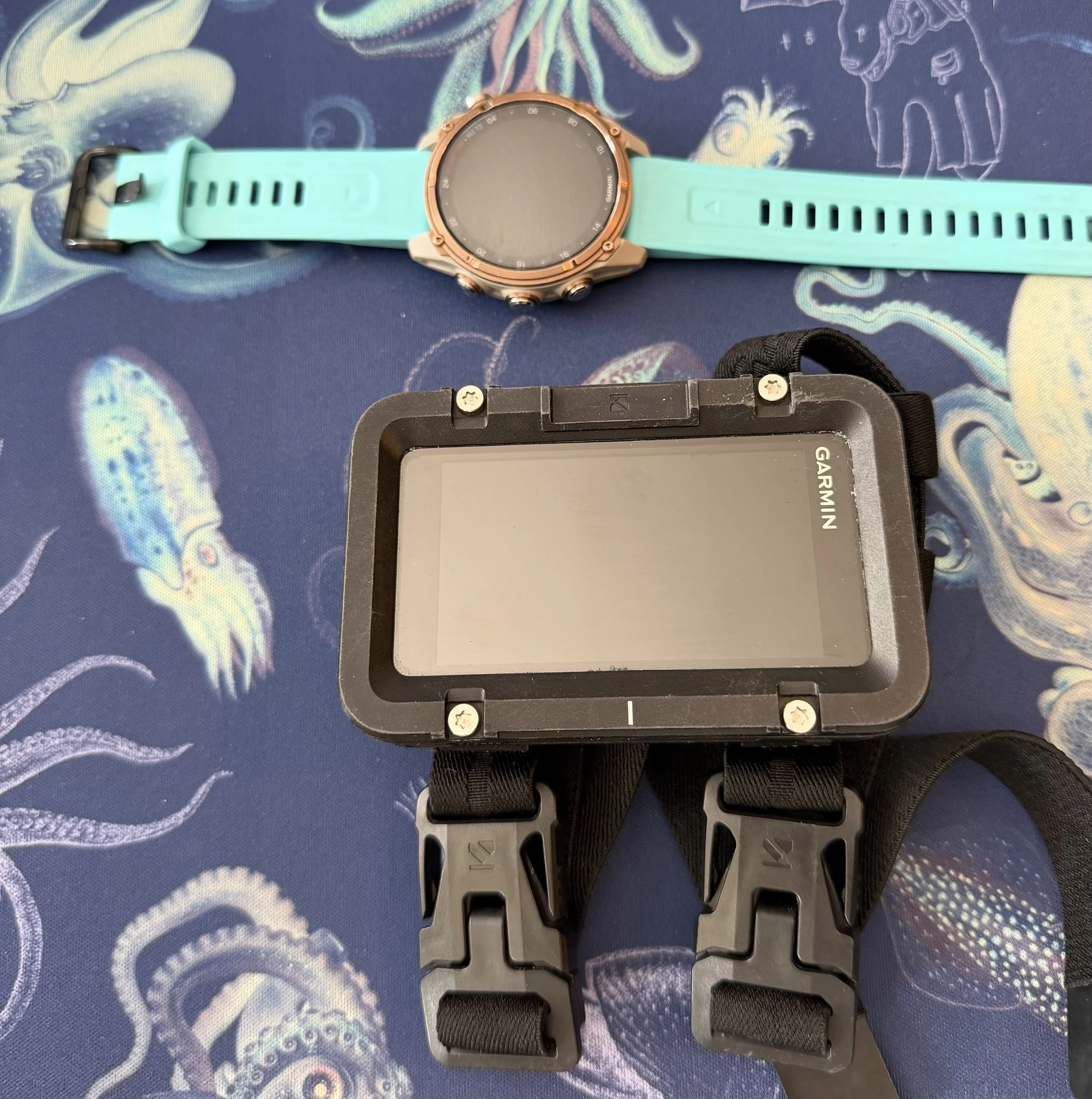
Air integration has become one of the most talked about features in modern dive computers, and for good reason. Instead of checking a traditional submersible pressure gauge, an air-integrated computer receives information directly from a wireless transmitter attached to your first stage. Your remaining cylinder pressure is displayed right alongside your depth, time, and no decompression limit.
Diving without constantly looking down at a pressure gauge feels surprisingly natural once you get used to it. Having all of your information in one place makes it easier to maintain awareness of what's happening throughout the dive. Some computers even estimate your remaining gas time based on your breathing rate, giving you another useful piece of information when planning your ascent.
Air integration certainly isn't necessary to dive safely. Thousands of divers happily use traditional pressure gauges every day. Still, after diving with an air-integrated computer, going back to a separate SPG can feel a bit like returning to paper maps after using GPS. Both work perfectly well, but one simply offers a little more convenience.
Wrist or Console?
Years ago, console computers were far more common than they are today. Many divers still prefer having their pressure gauge, compass, and computer together in one console, and there's absolutely nothing wrong with that approach. Rental equipment around the world still frequently uses console computers because they're durable, reliable, and easy to manage.
Wrist-mounted computers have become the most popular option for recreational divers, and that's what you'll see on most dive boats today. Having your computer on your wrist means the information you need is always within sight, whether you're checking your depth while hovering over a reef or monitoring your ascent at the end of the dive. Reaching for your wrist often feels more natural than searching for a console clipped to your BCD.
Personal preference plays a big role here. Plenty of experienced divers continue to use consoles after decades underwater, while others would never consider giving up a wrist-mounted computer. Spending a few minutes handling both styles at your local dive shop is often the easiest way to decide which feels right to you.

Rechargeable or Replaceable Batteries?
Battery style is another feature that deserves more thought than it usually gets. Some dive computers use rechargeable batteries, while others rely on user-replaceable or service-replaceable batteries. Neither option is automatically better, but each comes with advantages.
Rechargeable computers are convenient as long as you remember to plug them in before a dive trip. Many divers already travel with chargers for cameras, lights, phones, and watches, so adding one more cable isn't a major inconvenience. Battery life has also improved dramatically, allowing many modern computers to last through several days of diving on a single charge.
Replaceable batteries offer a different kind of peace of mind. Running low before a trip often means stopping at a dive shop or replacing the battery yourself, depending on the model. Remote destinations can make that process more challenging, so understanding how your computer handles battery changes before you travel is always a good idea.
Color Screens and Displays
Bright color displays look fantastic in advertisements, and many of them are equally impressive underwater. Reading information at a glance can be easier with color-coded alerts and large, high-contrast numbers. Divers who spend a lot of time underwater or whose eyesight isn't quite what it used to be often appreciate the extra visibility.
Black-and-white displays shouldn't be overlooked, though. Many have excellent contrast, exceptional battery life, and provide every piece of information a recreational diver needs. A beautiful screen doesn't automatically make a computer safer or more capable.
Display layout matters just as much as color. A screen that presents information clearly is almost always easier to use than one trying to fit too much onto a single page. Looking beyond the marketing photos and paying attention to how the information is organized can make a surprising difference.
Digital Compass
A built-in digital compass is one of those features that some divers absolutely love while others rarely use. Divers who spend time navigating wrecks, exploring shore dives, or diving in lower visibility often find it incredibly useful. Having a compass integrated into your computer also means carrying one less piece of equipment.
Traditional magnetic compasses continue to work extremely well and remain a reliable choice. Plenty of experienced divers still prefer them because they're simple, dependable, and don't rely on batteries or software. Choosing between the two often comes down to personal preference rather than one being objectively better than the other.

Smartwatch Features
Modern dive computers continue to blur the line between dive computer and everyday smartwatch. Many models now track steps, heart rate, sleep, GPS activities, and dozens of other fitness metrics alongside their diving functions. Wearing the same watch every day also means you're less likely to forget it when heading to the dive boat.
Those extra features certainly add value for some people, especially if they already wear a smartwatch. Others would rather spend their money on diving features than daily fitness tracking. Thinking about how you'll use the computer between dive trips can help determine whether those additions are worth the extra cost.
Remember Why You're Buying It
Shopping for a dive computer can quickly turn into comparing dozens of features you'll rarely use underwater. Every new model promises something bigger, brighter, or smarter than the last. Looking past the marketing and focusing on the features that genuinely improve your diving usually leads to a purchase you'll be happy with for many years.
Every diver's priorities are a little different, and that's perfectly okay. Someone who spends every weekend underwater may value features that a vacation diver never thinks twice about. Finding the right balance for your own diving is always more important than buying whatever happens to be the newest release.

Learn Your Computer Before You Dive It
Buying a dive computer is only the first step. Taking a little time to learn how it works before your first dive will make you a safer and more confident diver. A few minutes spent exploring the menus at home is far less stressful than trying to figure them out during a boat briefing.
Start by making sure you know how to check your battery level, review your dive log, adjust your gas settings, and understand the information displayed on the main dive screen. Nitrox divers should also know how to set the correct oxygen percentage and verify the maximum PO₂ before every dive. Those simple habits quickly become second nature and help prevent avoidable mistakes.
Every manufacturer organizes menus a little differently. Reading the manual may not be exciting, but knowing where to find important information before you need it is well worth the effort.

Understand What Your Computer Is Telling You
Most divers glance at their computer to check their depth and remaining dive time, but your computer is working much harder than that. Every second underwater, it's tracking your no decompression limit (NDL), monitoring your ascent rate, calculating your tissue loading, recording your maximum depth, and keeping track of your dive profile. During repetitive dives, it also accounts for residual nitrogen from previous dives and adjusts your limits accordingly.
A safety stop reminder is another feature many divers come to appreciate. Most computers automatically prompt you to complete a three-minute stop, helping reinforce one of the simplest habits that contributes to safer diving. Many also display a Time to Fly countdown after your final dive, giving you guidance on when it's appropriate to board an aircraft.
Nitrox divers receive even more information. After entering the correct oxygen percentage, your computer calculates your maximum operating depth (MOD) based on the PO₂ setting you've selected. Most recreational divers plan around a maximum PO₂ of 1.4 ATA, while 1.6 ATA is generally considered the recreational upper limit and is typically reserved for contingency or decompression situations rather than routine dive planning.
Many computers also monitor your Central Nervous System (CNS) oxygen exposure, and some track Oxygen Toxicity Units (OTUs). Recreational divers on a typical vacation are unlikely to approach those limits, but the information becomes increasingly valuable during repetitive nitrox diving or longer dive trips.

Practice Before Your Big Trip
A new dive computer deserves a few easy dives before joining you on the trip of a lifetime. Spending an afternoon in the pool or completing a simple shore dive gives you a chance to become familiar with the display, alarms, and button layout without feeling rushed.
Comfort with your computer grows surprisingly quickly. After a handful of dives, checking your depth, NDL, ascent rate, and gas supply becomes almost automatic. Familiarity also means you'll spend less time looking at your wrist and more time looking at the incredible marine life around you.
One Computer, One Diver
Every diver should have their own computer, and that computer should stay with them throughout the entire diving day. Dive computers don't just calculate what's happening on your current dive. They also remember your previous dives, your surface intervals, and the nitrogen your body has absorbed over time.
Sharing a dive computer between buddies or switching to a different computer partway through the day means those calculations are no longer based on your actual dive profile. That's why every major training agency recommends each diver use their own computer for every dive.

Take Care of It
Dive computers are built for the underwater environment, but a little maintenance goes a long way. Rinse your computer thoroughly with fresh water after diving, especially after saltwater dives, and pay attention to any sand or salt that may collect around the buttons or charging contacts.
Rechargeable models should be fully charged before a dive trip, while replaceable batteries should be changed according to the manufacturer's recommendations. Software updates are also worth checking every now and then, as manufacturers occasionally improve performance or add new features.
Taking care of your computer helps ensure it's ready when you need it most.
And With That…
Technology continues to improve every year, and there's always going to be another dive computer with a brighter screen or a longer list of features. None of those things matter nearly as much as choosing a computer you understand and trust.
The best dive computer isn't necessarily the most expensive one or the one your buddy recommends. The best dive computer is the one that fits your diving, provides information clearly, and gives you the confidence to make good decisions underwater.
Scuba diving has always been about managing risk through knowledge, preparation, and good decision-making. A dive computer is one of the best tools we have to support those decisions. Learn how it works, dive with it often, and let it become a trusted part of every adventure beneath the surface.
Dive safe, explore passionately, and remember…